- Received
- Washing
- Ready
- Done
- Ready for pickup At Laundry Contoh Margonda 7 Nov 14:20
- Ironed 7 Nov 11:05
- Dried 7 Nov 08:40
- Washed 6 Nov 19:10

A laundry POS for every branch that reads your WhatsApp chats. One button fills in the customer, the services, the quantities and the pickup address. You check it, then save.

WhatsApp chat
Customers write to the branch's WhatsApp number. Owners and admins answer from Toko Laundry, see that customer's orders and create a new one without leaving the chat.
Read the chat guideChats from every branch number, shared across the team. Pick one from the queue or assign it to a teammate.
Create an order for that customer from the conversation, or ask for a draft read from the chat.
Closed chats are kept, can be filtered by the day they closed and reopened. Traffic shows who is chatting right now, who is handling them and for how long.


Features
Laundry software for one branch or many: the counter, production, couriers, supplies, attendance and payroll.
See every featureCustomers get the receipt and laundry updates straight on WhatsApp.


Floor staff scan a code to mark each order's stage of work.


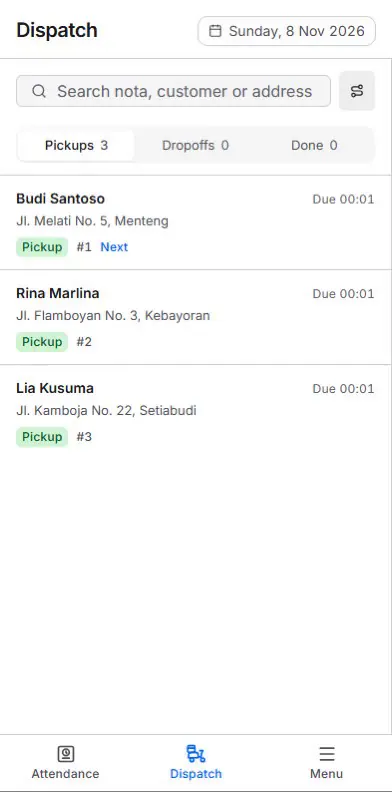
Today's pickups and deliveries, with proof photos.


Revenue and orders by branch and by day.


Record and watch supplies at every branch.


Daily staff attendance and payroll in one app.


Up to five businesses on one owner account, each with its own branches and staff access.


A customer's WhatsApp chat becomes an order draft you check before it is saved.


AI
Many orders arrive as a long chat. Toko Laundry reads it and prepares a draft: the customer, the services, the quantities and the pickup address.
Read the AI draft guideThe customer writes on WhatsApp as usual. From that conversation in the inbox, the owner or an admin presses one button for a draft.
Name, number, services, quantities and address are filled from the chat.
The owner or admin changes whatever needs changing. No order, customer or service is created until a person has checked it and saved.
Everywhere
Cashiers work at a computer. Floor staff and couriers use their phones.
Create the order, weigh it, take payment and send the receipt, from a wide screen on the counter computer.
Floor staff scan a code to mark each stage of work. Couriers open today's pickups and deliveries and photograph the proof.
Press / to search customers, conversations and messages, j and k to move between conversations, and o to draft an order from the chat. In the composer, # opens canned responses and Shift+Enter starts a new line. Press ? to list every shortcut.


Printed receipts
Customers who ask for a paper receipt still get one. The cashier prints it from the order, and the digital receipt still goes to WhatsApp.
Read the receipt guideThe receipt fits the paper width of the cashier's thermal printer. Your laundry's logo prints at the top.
Press Print receipt on the order. It prints through the browser to the printer connected to the cashier's device.
The production team scans the QR code on the receipt to move the laundry to its next stage.

Mobile app
Until then, open Toko Laundry in your phone's browser and add it to the home screen.
Payments
When the order is created, the cashier picks how it is paid. The customer pays from WhatsApp.
Read the payments guideQRIS from any bank or e-wallet app, a virtual account (VA), or pay at the counter in cash, by transfer or by card. QRIS and VA links go to the customer on WhatsApp.
Online payments from every branch land in one business balance. The owner withdraws it to a bank account whenever they like, Rp10.000 at the least. Reports stay per branch.
The owner fills in the payout bank account once in Settings. Online payment switches on for the business as soon as the account is saved.



Toko Laundry takes no commission on online payments. The payment provider's transaction fee is deducted from each payment you receive.
Order tracking
A receipt number or a phone number is enough. Customers see every step, from weighed to ready for pickup.
Read the API guideA receipt number for one order, a phone number for every order not yet finished.
One endpoint, a JSON answer. The look is yours to build.
Only the status, the steps and the history come out. The customer's name is masked.
Pricing
Multi-branch laundry software that starts free with one branch. Move up when you open more, and one plan covers every business you own.
See the pricing details
1 branch
Rp0 per month
For a laundry with one branch.
2-3 branches
Rp149.000 per month
For an owner with a few branches.
4-10 branches
Rp399.000 per month
For a larger network of branches.
Questions
Your branches do not stop at once. There is a grace period of 7 days. After that you return to the Free plan: across every business you pay for, the oldest branch stays open, while branches and businesses added on the paid plan lock completely until the plan is renewed. The data stays saved.
A pay link arrives by email to the owner who pays for the plan and in the app. You decide whether to pay it. Nothing is charged on its own.
Toko Laundry takes no commission on QRIS and VA payments. The payment provider's transaction fee is deducted from each payment you receive.
Self-serve plans cover up to 20 branches. For more, chat with us on the Contact page and we set the plan up with you.
Yes, once. Each branch uses one WhatsApp number, set in the branch settings. After that, receipts and laundry updates go out from that number.
Yes. The customer list imports from a .csv or .xlsx file, with a template on the Customers page.